All video displays are RGB devices. If an RGB signal is delivered to a display, the display's processing electronics have very little work to do. Aside from a computer source - or in Hollywood, where production workflows may be RGB after being converted from RAW camera files - content delivered to consumers from popular video delivery media such as streaming, cable, or disc devices is invariably in Y'CbCr component form with chroma downsampled to 4:2:0.
When a component video signal is delivered to a contemporary video display, the display ultimately performs color space conversion into RGB. If the incoming signal consists of chroma subsampling at 4:2:0, the conversion process dictates the video be converted from 4:2:0 → 4:2:2 → 4:4:4 → RGB, where it is then sent to the display's image process controller for formatting (depending on the display technology).
"While a natural inclination is to suspect device or display failure, check all menu adjustments first. The culprit is often a color space mismatch - easily fixed by restoring factory settings."
If chroma upsampling is selectable on the source device, it may be possible to output 4:2:2, where the display will only be required to scale Cb and Cr to create a 4:4:4 image for RGB conversion. If chroma upsampling is output selectable at 4:4:4, no scaling is necessary. If the display is sent an RGB signal, all conversion steps are bypassed entirely.
Where conversion takes place should be determined by what device performs color conversion best. Flagship flat panels and projectors likely incorporate the most accurate conversion process a manufacturer can offer. Therefore, consideration must be given to whether a $99 streaming device that provides chroma upsampling adjustment performs this better than the $4,999 premium flat panel.
A side issue: why send the most complex bandwidth-intensive signal down the pipeline to the display, only to have the display do little to no work converting it to RGB - unless the source is outputting RGB directly?
Recognizing and Fixing Color Space Conversion Errors
All displays are designed to automatically identify the color space of the incoming signal. However, menu adjustments that force conversion - rather than allow the display to decide automatically - may result in the display incorrectly rendering the incoming signal.
Pinkish / Greenish Cast (Fig. 1)
If the incoming signal is from a game console in RGB, but a menu adjustment on the display forces all signals to be displayed in Y'CbCr, the image will appear pinkish or greenish.

Purplish Cast with Greenish Blacks (Fig. 2)
Similarly, image discoloration will result if a source device menu adjustment forces output at Y'CbCr but the display is adjusted for only RGB signals. The overall hue of the image results in a purplish cast, with darker colors and black appearing greenish.

How to Fix It
If the problem persists after checking menu adjustments, the best practice is to default all devices and the display to their original factory settings. While rare with newly installed displays, image discoloration could also stem from an internal failure such as the TCON (timing control) board - a common issue on displays that have seen years of use. Occasionally, a failed HDMI cable may prevent a color channel from passing correctly.
A Murideo Fox & Hound kit will help determine the problem in minutes - available through BEENEXT for integrators across India.
Technical Background - Color Standards and HDR
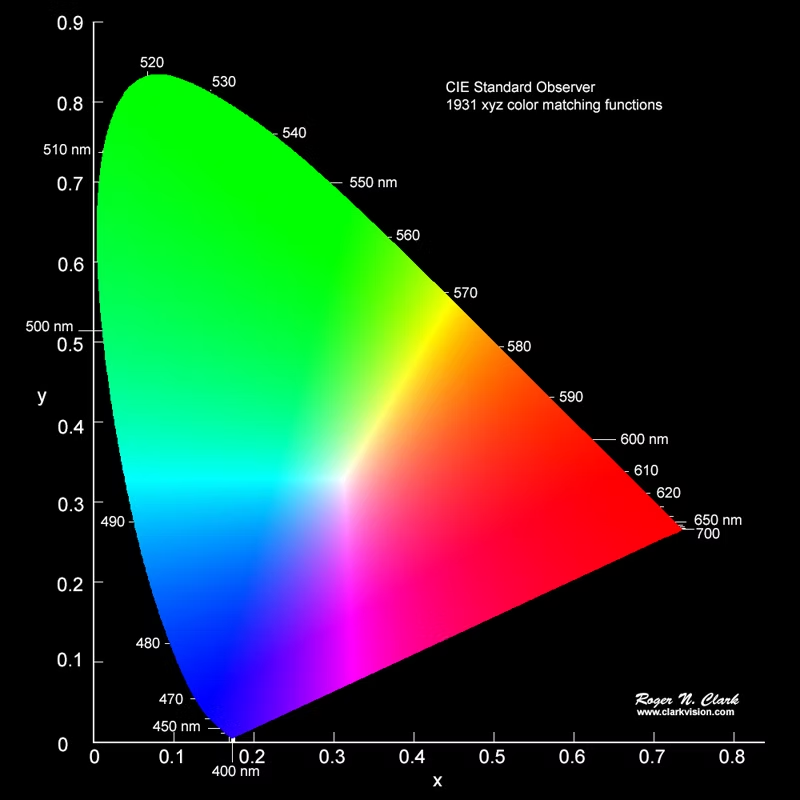
Content from sources to today's video displays is delivered using one of two color models. At the onset of HD television development in the late 1980s, the Consultative Committee on International Radio (CCIR) recommended a worldwide HDTV standard - their proposal, REC. 709, was superseded by the ITU in 1992 as ITU-R BT.709-1. In August 2012, the ITU announced the next generation of specifications: ITU-R BT.2020.
| Standard | Color Gamut | Peak Luminance | White Point |
|---|---|---|---|
| BT.709 | 35.9% of human perception | 100 nits | D65 |
| DCI-P3 | 53.6% of human perception | 300 nits | D65 (consumer) |
| BT.2020 | 75.8% of human perception | 1,000 nits (up to 10,000) | D65 |
BT.709 and BT.2020 share the same illuminant D65 white point (x = 0.3127, y = 0.3290). BT.2020 more than doubles the color gamut coverage of BT.709 and allows for ten times the luminance - up to 1,000 nits (the threshold target for mastering, though some displays can approach 4,000 nits).
DCI-P3
DCI-P3 is a Hollywood production color space presented to consumers theatrically. It originally had a different, green-leaning white point to accommodate theatrical film projectors using xenon-arc lamps. In early 2024, Digital Cinema Initiatives approved a consumer gamut workflow white point to the D65 x and y points, called DCI-P3-D65 (also Apple's Display P3). The color primaries remain at DCI-P3 theatrical points, with Y at 300 nits, to align with digital production standards.
HDR - BT.2100 and PQ
Using the same white point primaries as BT.2020, SMPTE in 2014 adopted a Dolby development known as the perceptual quantizer (PQ) and standardized it as SMPTE ST 2084 - a transfer function replacing the fixed gamma curve used in standard dynamic range (SDR). The ITU adopted BT.2100 in 2016, representing high dynamic range via PQ for streaming and movies, and HLG for broadcast TV. BT.2100 is future-forward, accommodating luminance levels up to 10,000 nits.
Chroma Subsampling in SDR Content
SDR content is delivered by cable, streaming, and DVD/Blu-ray/UHD Disc as component video (YCbCr) 4:2:0 - though most DVD players chroma upsample to 4:2:2 to overcome limitations in early MPEG color conversion. This compression is virtually imperceptible and was chosen as the most efficient means of delivering content with no apparent color fidelity loss.
Some devices such as Apple TV are able to perform chroma upsampling onboard. This burdens system infrastructure by having the device do the "heavy lifting" the display would generally do - needlessly forcing a higher bandwidth signal down the pipeline and typically not performing chroma upsampling with the same degree of accuracy as the display's own processing.
The content in this article is derived from Murideo and has been adapted for informational purposes only.